External API
The External API lets your own software read and change data in Fliteca. For example, your dispatch system can get the latest position of every truck, or create geo-zones for new customers.
You make an API key in Fliteca and give it to your IT team or software supplier.
Note
The External API is not available in the standard plans. Click Upgrade on the General page to see available options with your subscription, or contact us directly so we can discuss your needs and required resources.
The External API page
Click Fleet in the top menu, then External API on the left.
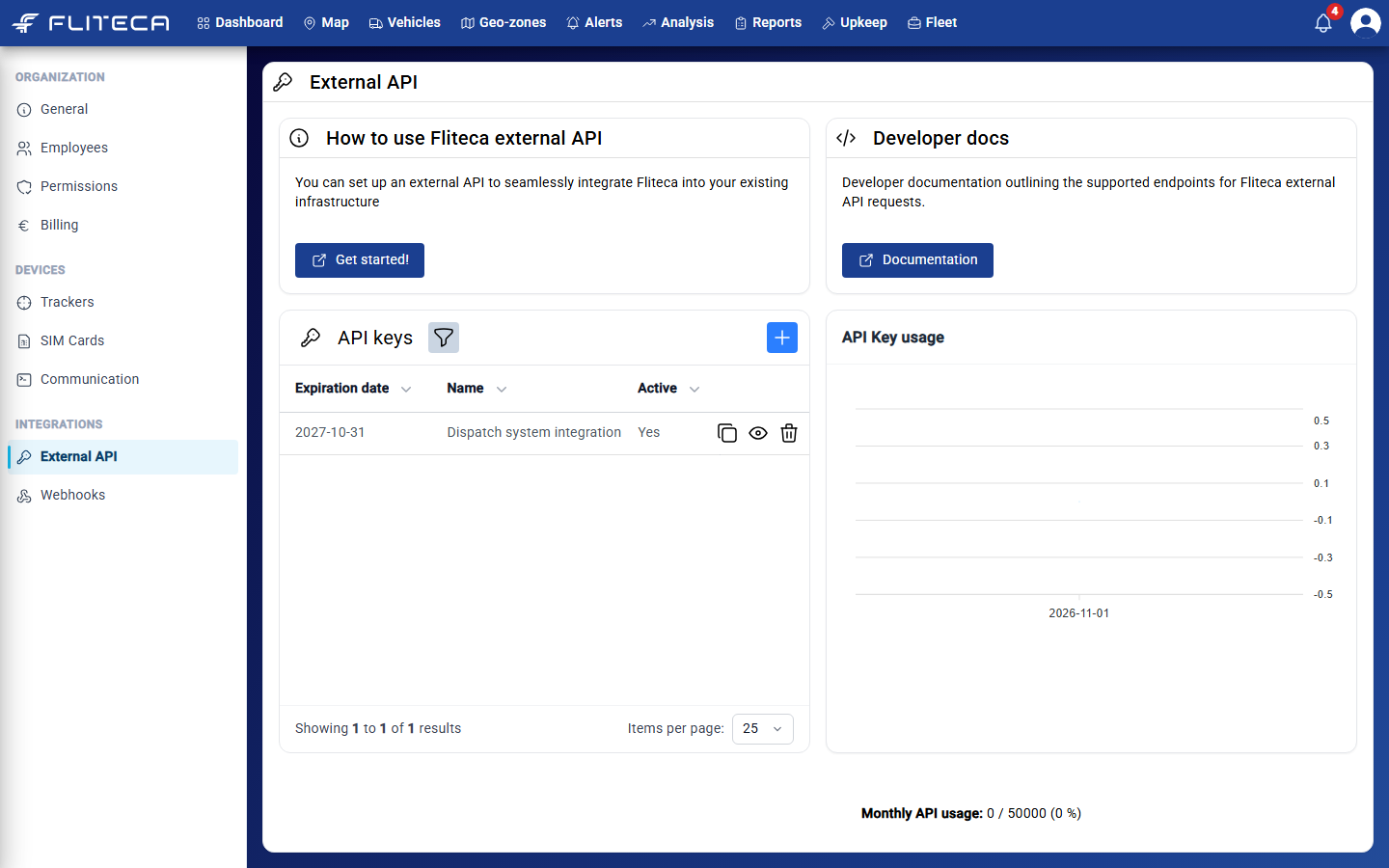
How to use Fliteca external API – Get started! opens this page.
Developer docs – Documentation opens the list of everything the API can do. It is also at the end of this page.
API keys – your keys.
API Key usage – how many requests your keys made each day.
Monthly API usage at the bottom – how many requests you made this month, out of how many your plan allows.
Make an API key
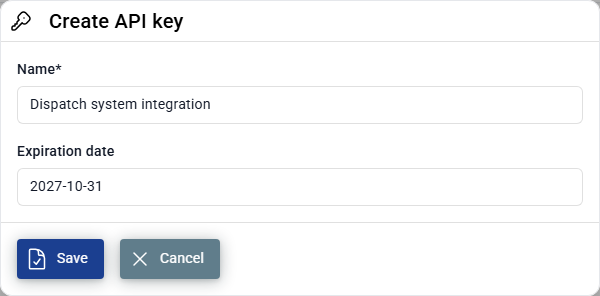
In API keys, click +.
Give the key a name that says who uses it, for example “Dispatch system integration”.
Choose the Expiration date. After that date the key stops working.
Click Save.
In the key’s row:
The copy button copies the key, so you can paste it where you need it.
The eye shows the key.
The bin deletes the key. Software that uses it can no longer connect.
Warning
An API key works like a password for your company’s data. Only give it to people you trust, and delete it when it is no longer used.
For developers
The API address is
https://api.fliteca.com.Send the API key in the
Authorizationheader of every request:curl https://api.fliteca.com/api/v1/vehicles \ -H "Authorization: Bearer YOUR_API_KEY"
Every request counts towards the monthly limit of your plan. When you reach it, the API answers
Request limit reacheduntil the next month.Requests only see your own company’s data.
API reference
Exports
- GET /api/v1/exports/gpx/{vehicleId}
- Parameters:
vehicleId (string)
- Query Parameters:
startTime (string)
endTime (string)
trackName (string)
- Status Codes:
200 OK – OK
400 Bad Request – Bad Request
401 Unauthorized – Unauthorized
403 Forbidden – Forbidden
404 Not Found – Not Found
500 Internal Server Error – Internal Server Error
- GET /api/v1/exports/gpx/{vehicleId}/extended
- Parameters:
vehicleId (string)
- Query Parameters:
startTime (string)
endTime (string)
trackName (string)
- Status Codes:
200 OK – OK
400 Bad Request – Bad Request
401 Unauthorized – Unauthorized
403 Forbidden – Forbidden
404 Not Found – Not Found
500 Internal Server Error – Internal Server Error
- GET /api/v1/exports/gpx/{vehicleId}/10hz
- Parameters:
vehicleId (string)
- Query Parameters:
startTime (string)
endTime (string)
trackName (string)
- Status Codes:
200 OK – OK
400 Bad Request – Bad Request
401 Unauthorized – Unauthorized
403 Forbidden – Forbidden
404 Not Found – Not Found
500 Internal Server Error – Internal Server Error
- GET /api/v1/exports/gpx/{vehicleId}/extended/10hz
- Parameters:
vehicleId (string)
- Query Parameters:
startTime (string)
endTime (string)
trackName (string)
- Status Codes:
200 OK – OK
400 Bad Request – Bad Request
401 Unauthorized – Unauthorized
403 Forbidden – Forbidden
404 Not Found – Not Found
500 Internal Server Error – Internal Server Error
Geo Zones
- GET /api/v1/geo-zones
- Status Codes:
200 OK – OK
400 Bad Request – Bad Request
401 Unauthorized – Unauthorized
403 Forbidden – Forbidden
404 Not Found – Not Found
500 Internal Server Error – Internal Server Error
- POST /api/v1/geo-zones
- Status Codes:
201 Created – Created
400 Bad Request – Bad Request
401 Unauthorized – Unauthorized
403 Forbidden – Forbidden
404 Not Found – Not Found
500 Internal Server Error – Internal Server Error
- GET /api/v1/geo-zones/{geoZoneId}
- Parameters:
geoZoneId (string)
- Status Codes:
200 OK – OK
400 Bad Request – Bad Request
401 Unauthorized – Unauthorized
403 Forbidden – Forbidden
404 Not Found – Not Found
500 Internal Server Error – Internal Server Error
- PUT /api/v1/geo-zones/{geoZoneId}
- Parameters:
geoZoneId (string)
- Status Codes:
204 No Content – No Content
400 Bad Request – Bad Request
401 Unauthorized – Unauthorized
403 Forbidden – Forbidden
404 Not Found – Not Found
500 Internal Server Error – Internal Server Error
- DELETE /api/v1/geo-zones/{geoZoneId}
- Parameters:
geoZoneId (string)
- Status Codes:
204 No Content – No Content
400 Bad Request – Bad Request
401 Unauthorized – Unauthorized
403 Forbidden – Forbidden
404 Not Found – Not Found
500 Internal Server Error – Internal Server Error
Groups
- GET /api/v1/groups
- Status Codes:
200 OK – OK
400 Bad Request – Bad Request
401 Unauthorized – Unauthorized
403 Forbidden – Forbidden
404 Not Found – Not Found
500 Internal Server Error – Internal Server Error
- PUT /api/v1/groups
- Status Codes:
200 OK – OK
400 Bad Request – Bad Request
401 Unauthorized – Unauthorized
403 Forbidden – Forbidden
404 Not Found – Not Found
500 Internal Server Error – Internal Server Error
- DELETE /api/v1/groups
- Query Parameters:
groupName (string)
- Status Codes:
200 OK – OK
400 Bad Request – Bad Request
401 Unauthorized – Unauthorized
403 Forbidden – Forbidden
404 Not Found – Not Found
500 Internal Server Error – Internal Server Error
Track Points
- GET /api/v1/track-points/latest
- Status Codes:
200 OK – OK
400 Bad Request – Bad Request
401 Unauthorized – Unauthorized
403 Forbidden – Forbidden
404 Not Found – Not Found
500 Internal Server Error – Internal Server Error
- GET /api/v1/track-points/latest/{vehicleId}
- Parameters:
vehicleId (string)
- Status Codes:
200 OK – OK
400 Bad Request – Bad Request
401 Unauthorized – Unauthorized
403 Forbidden – Forbidden
404 Not Found – Not Found
500 Internal Server Error – Internal Server Error
- GET /api/v1/track-points/latest/grouped
- Query Parameters:
groupName (string)
- Status Codes:
200 OK – OK
400 Bad Request – Bad Request
401 Unauthorized – Unauthorized
403 Forbidden – Forbidden
404 Not Found – Not Found
500 Internal Server Error – Internal Server Error
- GET /api/v1/track-points/latest/grouped/extended
- Query Parameters:
groupName (string)
- Status Codes:
200 OK – OK
400 Bad Request – Bad Request
401 Unauthorized – Unauthorized
403 Forbidden – Forbidden
404 Not Found – Not Found
500 Internal Server Error – Internal Server Error
- GET /api/v1/track-points/latest/ungrouped
- Status Codes:
200 OK – OK
400 Bad Request – Bad Request
401 Unauthorized – Unauthorized
403 Forbidden – Forbidden
404 Not Found – Not Found
500 Internal Server Error – Internal Server Error
- GET /api/v1/track-points/historic
- Query Parameters:
vehicleId (string)
startDate (string)
endDate (string)
pageSize (integer)
pageNumber (integer)
- Status Codes:
200 OK – OK
400 Bad Request – Bad Request
401 Unauthorized – Unauthorized
403 Forbidden – Forbidden
404 Not Found – Not Found
500 Internal Server Error – Internal Server Error
Tracker Commands
- GET /api/v1/tracker-commands/{commandId}
- Parameters:
commandId (string)
- Status Codes:
200 OK – OK
400 Bad Request – Bad Request
401 Unauthorized – Unauthorized
403 Forbidden – Forbidden
404 Not Found – Not Found
500 Internal Server Error – Internal Server Error
- DELETE /api/v1/tracker-commands/{commandId}
- Parameters:
commandId (string)
- Status Codes:
204 No Content – No Content
400 Bad Request – Bad Request
401 Unauthorized – Unauthorized
403 Forbidden – Forbidden
404 Not Found – Not Found
500 Internal Server Error – Internal Server Error
- GET /api/v1/tracker-commands
- Query Parameters:
startDate (string)
endDate (string)
- Status Codes:
200 OK – OK
400 Bad Request – Bad Request
401 Unauthorized – Unauthorized
403 Forbidden – Forbidden
404 Not Found – Not Found
500 Internal Server Error – Internal Server Error
- POST /api/v1/tracker-commands
- Status Codes:
201 Created – Created
400 Bad Request – Bad Request
401 Unauthorized – Unauthorized
403 Forbidden – Forbidden
404 Not Found – Not Found
500 Internal Server Error – Internal Server Error
Vehicles
- GET /api/v1/vehicles
- Status Codes:
200 OK – OK
400 Bad Request – Bad Request
401 Unauthorized – Unauthorized
403 Forbidden – Forbidden
404 Not Found – Not Found
500 Internal Server Error – Internal Server Error
- GET /api/v1/vehicles/{vehicleId}
- Parameters:
vehicleId (string)
- Status Codes:
200 OK – OK
400 Bad Request – Bad Request
401 Unauthorized – Unauthorized
403 Forbidden – Forbidden
404 Not Found – Not Found
500 Internal Server Error – Internal Server Error
- PATCH /api/v1/vehicles/{vehicleId}
- Parameters:
vehicleId (string)
- Status Codes:
200 OK – OK
400 Bad Request – Bad Request
401 Unauthorized – Unauthorized
403 Forbidden – Forbidden
404 Not Found – Not Found
500 Internal Server Error – Internal Server Error
- GET /api/v1/vehicles/by-imei/{imei}
- Parameters:
imei (string)
- Status Codes:
200 OK – OK
400 Bad Request – Bad Request
401 Unauthorized – Unauthorized
403 Forbidden – Forbidden
404 Not Found – Not Found
500 Internal Server Error – Internal Server Error
- GET /api/v1/vehicles/group
- Query Parameters:
groupName (string)
- Status Codes:
200 OK – OK
400 Bad Request – Bad Request
401 Unauthorized – Unauthorized
403 Forbidden – Forbidden
404 Not Found – Not Found
500 Internal Server Error – Internal Server Error
- GET /api/v1/vehicles/group/tag
- Query Parameters:
groupName (string)
tagName (string)
- Status Codes:
200 OK – OK
400 Bad Request – Bad Request
401 Unauthorized – Unauthorized
403 Forbidden – Forbidden
404 Not Found – Not Found
500 Internal Server Error – Internal Server Error
- DELETE /api/v1/vehicles/{vehicleId}/tracker-commands
- Parameters:
vehicleId (string)
- Status Codes:
200 OK – OK
400 Bad Request – Bad Request
401 Unauthorized – Unauthorized
403 Forbidden – Forbidden
404 Not Found – Not Found
500 Internal Server Error – Internal Server Error